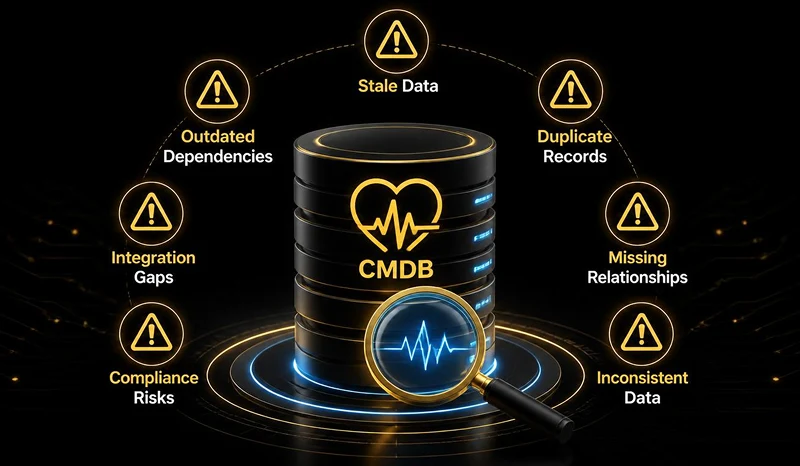
CMDB Health Check: 7 Warning Signs Your Configuration Data Is Failing You
In an enterprise IT ecosystem, your Configuration Management Database (CMDB) serves as the central brain. It maps out how applications, servers, databases, and cloud resources interlock to support critical business services. However, a CMDB is only as valuable as the integrity of the data stored within it. When configuration records become stale, duplicated, or inaccurate, the database transforms from a strategic asset into an operational liability.
Conducting a routine
CMDB Health Check: 7 warning signs your configuration data is failing you allows IT leaders to catch data decay before it causes widespread outages, failed audits, or security breaches.
In this guide, we break down the fundamental metrics of CMDB health, explore the seven critical red flags indicating your configuration data needs immediate attention, and outline a clear path toward governance and automated remediation.
The Core Metrics of ServiceNow CMDB Data Integrity
To evaluate whether your configuration data is healthy, ServiceNow organizes CMDB quality around three foundational pillars. Understanding these baseline metrics is essential before diagnosing specific operational failures:
Completeness: Evaluates whether mandatory fields (such as IP addresses, asset owners, and support groups) are filled out and whether relationship mappings between Configuration Items (CIs) exist.
 Correctness:
 Measures whether data is accurate, up-to-date, and free of orphan CIs, stale records, or duplicate entries created by conflicting discovery sources.
Compliance: Assesses whether configuration settings adhere to established corporate standards, security protocols, and regulatory benchmarks.
When any of these three pillars breaks down, operational risk increases exponentially across your IT Service Management (ITSM) and Change Management workflows.
7 Warning Signs Your Configuration Data Is Failing You
If your engineering or service desk teams are experiencing persistent operational friction, corrupt configuration data is often the root cause. Here are the seven key indicators that your CMDB requires an urgent health intervention:
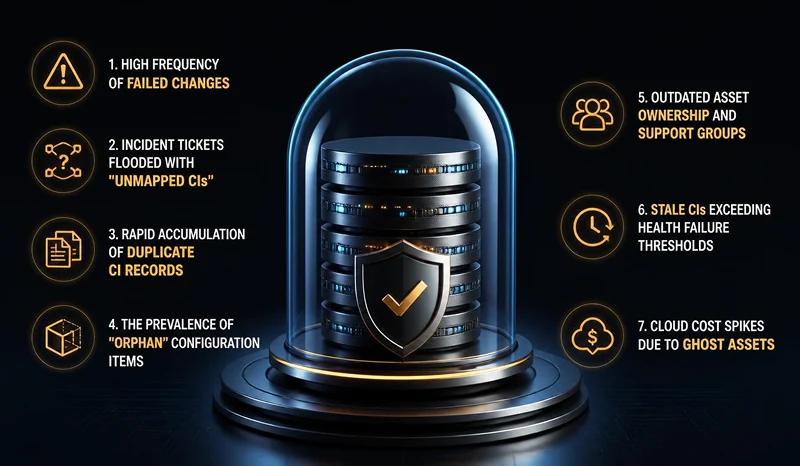
High Frequency of Failed Changes
When IT change managers evaluate an upcoming system patch or infrastructure upgrade, they rely on the CMDB to perform impact analysis. If changes consistently cause unexpected downstream outages, your CI relationship mapping is incomplete or broken.
Incident Tickets Flooded with "Unmapped CIs"
Service desk analysts shouldn't have to assign generic placeholder CIs to inbound incident tickets. If a significant percentage of tickets are categorized under generic "Global" or "Unknown" items, your discovery pipelines are missing active assets.
Rapid Accumulation of Duplicate CI Records
Deploying multiple discovery tools, such as AWS CloudWatch, Microsoft System Center, and ServiceNow Discovery, without strict Reconciliation Definition rules leads to duplicate records for a single physical or virtual asset.
The Prevalence of "Orphan" Configuration Items
An orphan CI is a record that exists in isolation without any mapped relationships to parent hardware, hosting environments, or business applications. Orphan CIs create phantom infrastructure that distorts licensing costs and security audits.
Outdated Asset Ownership and Support Groups
When an automated alert fires at 2:00 AM, the CMDB should immediately identify who owns the affected resource. If alerts regularly route to retired staff or decommissioned support teams, your CMDB data quality is actively delaying incident resolution times.
Stale CIs Exceeding Health Failure Thresholds
ServiceNow establishes baseline staleness thresholds (typically flagging records that haven't refreshed in 60 to 90 days). If thousands of records trigger staleness warnings, your discovery schedules or agent credentials have failed.
Cloud Cost Spikes Due to Ghost Assets
If your cloud billing statement lists active virtual machines or storage buckets that don't match active CMDB records, you are paying for "ghost assets", unmonitored cloud resources that drain budget and invite security threats.
How to Execute a Successful CMDB Cleanup Strategy
Recognizing these red flags is the first step; restoring data integrity requires a structured, repeatable remediation strategy. At Mirroar, we advise clients to follow three operational steps for long-term CMDB governance:
Implement Automated Identification and Reconciliation Rules (IRE)
Stop manual data entry. Configure ServiceNow's Identification and Reconciliation Engine (IRE) to enforce strict rules regarding which discovery sources have authoritative priority for specific CI attributes.
Establish Health Scorecards and Automated Remediation Tasks
Utilize ServiceNow CMDB Health Dashboards to automatically generate task assignments for asset owners when completeness or correctness scores drop below established thresholds.
Align CMDB Governance with Business Services
Instead of attempting to clean millions of raw CIs all at once, prioritize configuration data tied to your top 20 revenue-generating business services. Cleaning data from the service layer downward delivers immediate operational ROI.
Restore Integrity to Your ServiceNow Architecture with Mirroar
Maintaining a clean, reliable CMDB requires a clear governance strategy, automated reconciliation, and deep technical expertise across ServiceNow workflows. Eliminating stale configuration data is essential for driving proactive IT service management and protecting your operational resilience.
At
Mirroar, we help IT leadership and enterprise teams audit, optimize, and maintain high-performing ServiceNow environments built for enterprise scale.
Ready to eliminate data noise and regain total visibility over your IT infrastructure? Connect with our consultative advisory team at
Mirroar today to schedule a comprehensive CMDB Health Assessment.